Keychron K10 HE Review: Full-Size Wireless Power for Mobile Creators
Read from the Amazon listing on 4 Oct 2026. Figures below are the seller’s; scores are out of 10, based on listed specifications and buyer feedback.
As Amazon Associates, we earn from qualifying purchases. This means we may receive a small commission at no extra cost to you if you click through and make a purchase.
The Keychron K10 HE enters the mechanical workspace as a full-size solution built for demanding productivity and rapid input precision. Packing a complete 104-key ANSI layout into an aluminum chassis accented by natural wood sidings, this board integrates Gateron Double-Rail Nebula magnetic switches with versatile tri-mode wireless performance. For digital creators and power users who refuse to compromise on a physical number pad while seeking the advanced responsiveness of magnetic Hall Effect technology, this keyboard delivers an exceptionally refined typing experience.
This full-size board is well suited for creative professionals, video editors, and multi-system operators who run a stationary workstation or remote production basecamp and rely on granular key customization. The multi-device Bluetooth 5.2 and 2.4 GHz wireless setup makes juggling several machines effortless throughout a production day. Conversely, ultralight travelers and backpack-first minimalists who prioritize pack space over dedicated number pads might prefer compact form factors like the attack shark x66, as the K10 HE requires a generous footprint in transit.
Keychron K10 HE at a Glance

- Our score
- 9.0/10
- Brand
- Keychron
- Amazon code
- B0DXZF4D4S
Figures above are read from the Amazon product page, not measured here.
- Layout
- Full-Size 100% (104 Keys, QWERTY)
- Switch Model
- Gateron Double-Rail Nebula Magnetic Switch
- Switch Type
- Linear Hall Effect magnetic switch
- Actuation Range
- 0.2 mm to 3.8 mm (with 0.1 mm sensitivity)
- Connectivity
- Tri-Mode (Bluetooth 5.2, 2.4 GHz Wireless, Type-C Wired)
- Chassis Construction
- Aluminum and wood frame with natural rosewood sidings
- Plate Material
- Aluminum
- Keycaps
- OSA-profile double-shot PBT (non-shine-through)
- Backlighting
- RGB backlighting
- Configuration Software
- Keychron Launcher web configurator
Hall Effect Magnetic Switches and Rapid Trigger Precision
Listed spec Switch Model Gateron Double-Rail Nebula Magnetic Switch
At the center of this keyboard is its magnetic sensor design. Traditional mechanical keyboards rely on physical metal contact leaves that touch together to register a stroke, which naturally introduces physical friction and eventual wear over millions of cycles. The Keychron K10 HE Hall Effect switches operate entirely differently by using magnetic sensors to read the precise depth of the switch stem. Because there is no physical friction contact point inside the sensor mechanism, the switch motion remains exceptionally smooth while drastically minimizing long-term hardware wear.
The Gateron Double-Rail Nebula magnetic switches feature a linear profile and provide an impressive actuation range adjustable from 0.2 mm all the way to 3.8 mm, fine-tuned in precise 0.1 mm increments. This degree of control enables users to adjust keystroke behavior down to individual preference. For high-speed gaming or fast command execution, you can configure switches to fire at the slightest initial press. For typing-intensive work, lengthening the travel depth prevents accidental misfires on sensitive keys. Furthermore, the switches are hot-swappable, letting you remove or swap magnetic units easily without touching a soldering iron.
Beyond static actuation adjustments, the Keychron K10 HE rapid trigger and snap action features offer a profound operational advantage. Standard mechanical switches must rise past a fixed reset point before they can register a follow-up keystroke. With rapid trigger active, the switch resets the instant the key starts traveling upward, even by a fraction of a millimeter, and can immediately re-actuate on the way back down. When using the Keychron K10 HE for video editing, this rapid responsiveness transforms timeline navigation. Scrubbing through footage, making rapid razor cuts, and jogging frame-by-frame become far more fluid when the keys reset without delay.
Tri-Mode Wireless Setup and Workstation Power
Listed spec Connectivity Tri-Mode (Bluetooth 5.2, 2.4 GHz Wireless, Type-C Wired)
Workstation adaptability hinges on versatile connectivity, and the Keychron K10 HE wireless setup provides three distinct operating modes. Users can toggle between low-latency 2.4 GHz wireless, multi-device Bluetooth 5.2, or a direct USB Type-C wired connection. The 2.4 GHz mode delivers desktop-grade polling stability that satisfies both fast-paced creative work and competitive gaming without the tether of a cable. When you need a wired connection for firmware updates or stationary desk work, the detachable Type-C interface provides instantaneous plug-and-play responsiveness.
For editors managing complex workflows across multiple machines, the integrated Bluetooth 5.2 radio can pair with up to three distinct host devices simultaneously. You can seamlessly switch between an editing laptop, an office desktop, and a mobile tablet using hardware hotkeys. The keyboard communicates across diverse hardware categories, with manufacturer support listed for laptops, PCs, smartphones, tablets, and gaming consoles, allowing you to use a single input device across your entire hardware array.
Regarding power delivery, the board operates on an internal rechargeable battery for tether-free use. While the listing notes that the device is battery powered, the listing does not specify the exact milliamp-hour rating or estimated operating hours between charges under various RGB lighting modes. When it is time to recharge the board at your remote station, running a Type-C cable from a high-power desk supply like the anker prime 160w allows you to replenish the keyboard while running demanding workstation peripherals without clutter.
Keychron Launcher Web Configurator and Layout Customization
Listed spec Layout Full-Size 100% (104 Keys, QWERTY)
Software configuration on modern keyboards can often be cumbersome, but the Keychron K10 HE Launcher web configurator takes a browser-based approach. Rather than requiring users to install heavy background utility software that consumes system memory and complicates operating system migrations, Keychron hosts its full suite in a web portal. Keychron does advise that users clear their browser data, specifically cookies and cache, before launching the tool to ensure uninterrupted communication between the browser interface and the keyboard firmware.
Once connected, the web utility grants deep access to hardware-level mapping. You can reassign every key on the 104-key layout, build intricate multi-key macros, and map secondary functional layers to suit your specific post-production software. For creative software like digital audio workstations and color grading suites, having access to dedicated layers mapped to frequent export commands or clip splitting shortcuts dramatically streamlines daily output.
Crucially, the Launcher configurator is where you manage the magnetic switch properties. You can dial in the exact actuation depth for every individual key, select which keys utilize rapid trigger, and configure snap action parameters. This allows for nuanced configurations where alphanumeric keys maintain a standard typing depth to prevent typos, while navigational arrows and timeline controls are set to hyper-sensitive actuation depths for instantaneous response.
Chassis Construction, Rosewood Accents, and Keycap Quality
Listed spec Chassis Construction Aluminum and wood frame with natural rosewood sidings
The structural design of the K10 HE balances desktop sturdiness with a clean visual identity. The chassis combines an aluminum structure with an aluminum keyboard plate, resulting in a rigid platform that resists desk flex during vigorous typing. Keychron finishes the exterior with natural wood sidings, adding rosewood accents that give the board an organic, premium presence suited to professional studio desks. The white colorway provides a crisp visual contrast against the dark natural wood trim.
Keycap selection plays a major role in typing satisfaction, and this keyboard comes equipped with OSA-profile double-shot PBT keycaps. The OSA profile blends the height of standard OEM caps with the subtle spherical curvature of classic SA keycaps, providing an ergonomic dish that naturally centers fingertips. Double-shot PBT construction ensures exceptional resistance against skin oils, preventing the unsightly shine and smooth wear that plague cheaper ABS plastics over months of intensive use.
It is worth noting that these double-shot keycaps are non-shine-through. While the board features vibrant RGB backlighting that casts an attractive glow between and beneath the switch housings, the individual letter legends do not illuminate from within. In dim editing suites or low-light hotel rooms, the ambient RGB provides aesthetic mood lighting, but users who rely strictly on illuminated legends to identify key characters in total darkness may need an external desk lamp.
Cross-Platform Flexibility and macOS Compatibility
Cross-platform versatility is an essential requirement for modern digital creators who frequently alternate between operating systems. Keychron K10 HE macOS compatibility is engineered directly into the hardware, providing full native alignment with Apple operating systems as well as Windows environments. The board features dedicated media keys tailored to system controls like volume, track skipping, and screen brightness right out of the box.
To support this dual-system ecosystem, Keychron includes extra replacement keycaps in the package. Users can easily swap out Windows-specific keys for standard macOS Option and Command keys, ensuring physical key legends match operating system behavior. For PC environments, the listing specifies a minimum operating system version of Windows 10, ensuring complete operational support for modern desktop platforms.
For developers and system administrators working outside the Windows and Apple ecosystems, the board also adapts to Linux systems through remapping in the web configurator. Because key remaps and macro layers are saved directly to the keyboard hardware memory via the Launcher interface, your custom layouts remain fully active regardless of the machine or operating system you plug into.
Keychron K10 HE Pros and Cons
Pros
- Customizable 0.2mm to 3.8mm magnetic switch actuation
- Rapid trigger and snap action performance
- Versatile tri-mode wireless connectivity with Bluetooth 5.2
- Durable aluminum frame with natural rosewood accents
- Long-lasting OSA double-shot PBT keycaps
- Native macOS and Windows cross-system support
Cons
- Non-shine-through keycap legends in dark rooms
- Full-size footprint takes significant travel bag space
- Listing does not specify exact battery capacity
Who Should Buy the Keychron K10 HE
Buy It If
- You require a complete 100 percent full-size layout with a dedicated numeric keypad for data entry, audio editing, and extensive timeline navigation.
- You want the advanced responsiveness, longevity, and millimeter-level actuation tuning offered by Hall Effect magnetic switches.
- You switch constantly between multiple machines across Windows, macOS, and mobile platforms using multi-device Bluetooth 5.2 or 2.4 GHz wireless.
- You appreciate upscale workstation materials including an aluminum chassis, aluminum plate, OSA double-shot PBT keycaps, and natural rosewood accents.
Skip It If
- You need an ultra-compact, featherweight keyboard designed exclusively for cramped airline trays or ultralight travel packs.
- You work in dark editing bays and require shine-through keycap legends to read individual letters in the dark.
- You prefer an integrated wrist rest attached directly to the chassis out of the box.
Keychron K10 HE Alternatives Worth a Look
If the full-size magnetic switch design of the K10 HE does not completely align with your workstation priorities or travel weight limits, several other mechanical options cater to different desk arrangements.
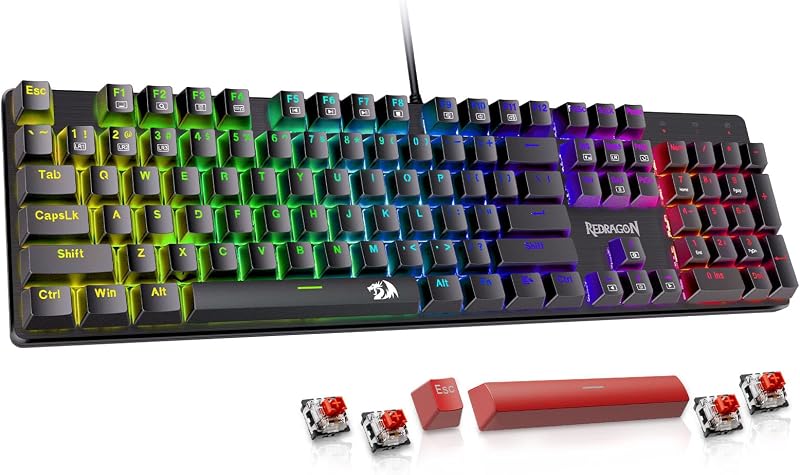
Redragon Mechanical Gaming Keyboard Wired
The Redragon Mechanical Gaming Keyboard Wired provides a functional alternative for users who want traditional mechanical red switches rather than magnetic Hall Effect sensors. It features 11 programmable backlit modes, hot-swappable switches, anti-ghosting, and double-shot PBT keycaps compatible with PC and Mac. Creators seeking a purely wired solution without the need for wireless battery maintenance will find this an accessible choice.
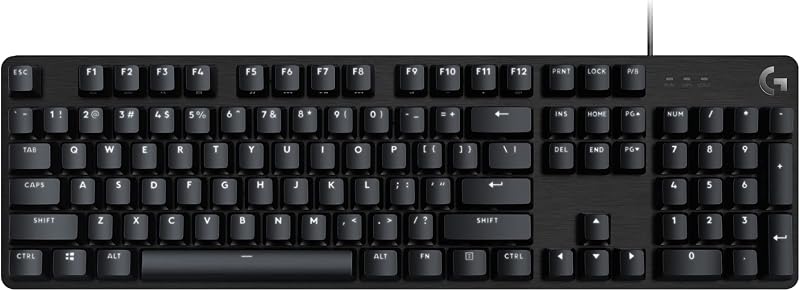
Backlit
The Backlit keyboard is a full-size mechanical gaming keyboard featuring an aluminum top plate, anti-ghosting technology, and native compatibility across Windows and macOS environments. Users who want an aluminum full-size keyboard with traditional mechanical feedback and standard backlighting from an established desktop manufacturer can consider this dependable alternative.
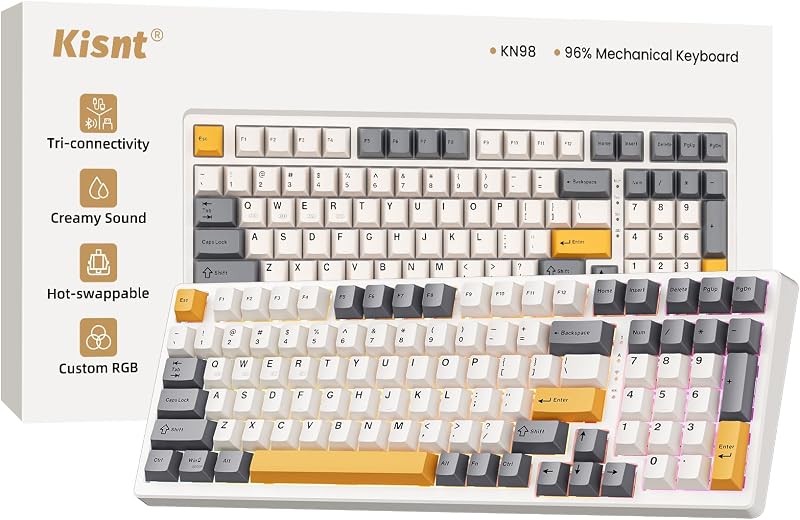
Kisnt KN98 Wireless Mechanical Keyboard
The Kisnt KN98 Wireless Mechanical Keyboard offers a slightly more compact 99-key layout that preserves the numeric keypad while reducing overall desk width. It includes tri-mode wireless connectivity via Bluetooth, 2.4G, and USB-C, custom RGB backlighting, creamy sound dampening, hot-swappable switch sockets, and a massive 8000mAh battery. Mobile editors wanting a dedicated numpad in a narrower footprint with explicit high-capacity battery specs should look closely at this board.
Final Verdict
When asking if the Keychron K10 HE is worth it, the answer depends on how much you value precise switch control and a complete desktop layout. By merging Gateron Double-Rail Nebula magnetic switches with an aluminum and wood frame, Keychron has delivered an input tool that excels across creative applications and high-speed gaming alike. The ability to fine-tune actuation depths from 0.2 mm to 3.8 mm, paired with rapid trigger resets, brings an unprecedented level of physical control to your fingertips.
While the full 104-key footprint and robust aluminum build make it more suitable for a stationary desk or semi-permanent production basecamp than a daily mobile carry, the tri-mode wireless flexibility ensures you can effortlessly drive laptops, tablets, and desktops simultaneously. If your workflow benefits from a full numeric cluster and you demand the latest innovations in magnetic switch performance, the Keychron K10 HE stands out as an outstanding, future-proof desktop investment.
FAQ
Can the Keychron K10 HE magnetic switches be swapped with standard mechanical switches?
No. The Gateron Double-Rail Nebula switches rely on Hall Effect magnetic sensors integrated into the circuit board rather than physical electrical pins. While the keyboard is hot-swappable, it is only compatible with compatible Hall Effect magnetic switches, not traditional 3-pin or 5-pin mechanical switches.
How does the actuation adjustment work on the Keychron K10 HE?
Using the Keychron Launcher web configurator, you can set the actuation travel point for each key individually between 0.2 mm and 3.8 mm with 0.1 mm precision. This allows you to assign hair-trigger actuation to time-sensitive keys while keeping standard typing keys at a deeper travel distance to prevent accidental strokes.
What does rapid trigger do for everyday workflows?
Rapid trigger dynamically activates and deactivates a key based on physical travel direction rather than fixed reset points on the switch stroke. As soon as you lift your finger upward, the key resets immediately and is ready to fire again, allowing for rapid repeated inputs during gaming or quick timeline scrubbing in video editing software.
Does the Keychron K10 HE support Apple Mac shortcuts?
Yes. The keyboard offers native macOS compatibility, featuring dedicated media keys aligned with macOS functions and extra replacement keycaps in the box so you can display physical Command and Option legends instead of Windows keys.
Why does Keychron suggest clearing browser data before using the Launcher configurator?
Keychron advises users to clear their browser cache and cookies prior to opening the web-based Launcher configurator to prevent outdated stored web data from interfering with the browser interface communicating directly with the keyboard hardware firmware.


