KOYOFEI PEI Build Plate for Neptune 4 Pro: Field-Ready 3D Printing
Read from the Amazon listing on 6 Oct 2026. Figures below are the seller’s; scores are out of 10, based on listed specifications and buyer feedback.
As Amazon Associates, we earn from qualifying purchases. This means we may receive a small commission at no extra cost to you if you click through and make a purchase.
The KOYOFEI Neptune 4 Pro Build Plate is a direct-replacement double-sided textured spring steel print surface engineered to eliminate first-layer failure and streamline model release on 235x235mm beds. Built around a resilient spring steel core finished with an ultra-fine matte black powder-coated PEI spray, it offers a sturdy mechanical upgrade over worn factory beds or single-sided replacements. For hobbyists and production technicians seeking reliable bed adhesion across both entry-level and high-temperature filaments, this plate delivers a consistent, tool-free workflow that lets you pop finished parts off cleanly without reaching for metal scrapers.
This drop-in bed surface is an ideal fit for rapid prototypers, educational lab managers, and mobile makers running batch printing jobs who cannot afford failed first layers or print bed damage during field operations. Conversely, users who require a mirror-gloss bottom layer on their printed parts, or those running larger platform sizes, will want to seek dedicated smooth sheets or alternative format dimensions instead of this textured platform.
KOYOFEI Neptune 4 Pro Build Plate at a Glance

- Our score
- 9.2/10
- Brand
- Koyofei
- Amazon code
- B0FGXZJSWD
Figures above are read from the Amazon product page, not measured here.
- Manufacturer
- KOYOFEI
- Dimensions
- 235 x 235 mm
- Substrate Material
- Spring Steel
- Surface Finish
- Double-Sided Matte Black Powder-Coated PEI
- Item Weight
- 11.3 ounces
- Package Dimensions
- 11.38 x 10.39 x 0.71 inches
- Compatible 3D Printers
- Elegoo Neptune 4 Pro, Neptune 4, Neptune 3 Pro
- Compatible Filaments
- PLA, TPU, PETG, ABS, Nylon
- Recommended PLA Bed Temperature
- 50 to 60 degrees Celsius
- Recommended ABS Bed Temperature
- 80 to 100 degrees Celsius
First-Layer Grip and Adhesion Dynamics
Achieving a reliable first layer is the single most critical step in FDM 3D printing, and the neptune 4 pro build plate addresses this by utilizing a uniform PEI spray coating. Polyetherimide exhibits unique thermal dynamics that create aggressive molecular adhesion when heated, locking down molten extruded plastic and counteracting the thermal contraction forces that lead to corner warping. On an active printing bed, the KOYOFEI Neptune 4 Pro plate creates an unyielding bond with common materials like PLA and PETG, while providing the intense thermal contact required to keep warp-prone materials like ABS and Nylon anchored throughout extended print cycles.
Thermal management plays a direct role in fine-tuning neptune 4 pro bed adhesion. The manufacturer guidelines emphasize that increasing the heatbed temperature enhances bond strength, allowing users to dial in their bed temperature depending on room ambient conditions and print geometry. For low-shrinkage materials such as PLA and TPU, maintaining a bed range of 50 to 60 degrees Celsius provides adequate hold. For more challenging polymers like PETG, dialing the bed to 70 to 80 degrees Celsius prevents premature release, while ABS benefits from temperatures between 80 and 100 degrees Celsius to prevent edge lift on large prints.
Surface contamination is the primary enemy of any textured PEI platform. Grease from handling and ambient workshop dust settle into the microscopic valleys of the powder-coated surface, forming a barrier that prevents plastic from biting into the texture. Maintaining pristine cleanliness requires washing the plate with regular detergent and warm water rather than abrasive chemicals. Keeping a clean workstation is equally essential; using a shark powerboost cordless handheld vacuum around your printing enclosure prevents airborne debris, stray plastic strands, and dust from landing on the warm bed before print initiation.
Model Release Mechanics and Plate Flexibility
The core utility of a neptune 4 pro spring steel plate lies in its mechanical flexibility and thermal release behavior. Rather than attacking printed parts with sharp spatulas that risk gouging the print surface or throwing the machine out of square, this platform relies on the natural expansion and contraction properties of the spring steel core. When the bed cools to room temperature, the difference in thermal shrinkage between the printed plastic and the metal substrate breaks the bond naturally, causing many prints to detach with an audible click without any physical intervention.
For large-footprint models or elastic filaments like TPU that retain strong mechanical grip, the operator simply lifts the plate off the magnetic base and gently flexes it outward. The flexible spring steel bends just enough to shear the model base away from the PEI coating, popping parts free in seconds. This rapid-turnaround capability significantly reduces cycle times between batch prints, making it an essential mechanical upgrade for high-throughput production desks.
Adhering to correct cool-down discipline is critical to preserve the longevity of the textured coating. The listing instructions specifically mandate waiting several minutes after a print job finishes to allow the plate to cool before attempting part removal. Forcing a print off a scorching bed can pull the PEI coating away from the steel plate or stretch delicate bottom walls. Patience during the cooling phase ensures the powder-coated surface remains intact and operational over hundreds of continuous thermal cycles.
Thermal Profiles and Filament Versatility
Listed spec Compatible Filaments PLA, TPU, PETG, ABS, Nylon
Modern print jobs frequently transition beyond standard PLA, and this neptune 4 pro pei sheet accommodates a broad range of engineering materials. The PEI powder coating stands up to high operating temperatures, allowing you to cycle between standard consumer filaments and technical materials without needing to apply messy glues, painter tape, or specialty release agents. The listing explicitly confirms compatibility with PLA, TPU, PETG, ABS, and Nylon, making this plate an exceptionally versatile foundation for diverse project requirements.
Operating each filament at its optimal bed temperature is vital for maximizing the plate’s performance:
- PLA: 50 to 60 degrees Celsius provides a rigid base without risking thermal softening or elephant’s foot.
- TPU: 50 to 60 degrees Celsius ensures reliable adhesion while preventing the flexible polymer from fusing permanently to the sheet.
- PETG: 70 to 80 degrees Celsius bridges the gap between PETG’s high surface tension and clean thermal release.
- ABS: 80 to 100 degrees Celsius generates sufficient thermal energy to halt shrinkage warping across dense geometries.
- Nylon: High-temperature tolerance accommodates the intense bed heating necessary to anchor demanding hygroscopic filaments.
Because the plate handles these diverse materials natively, print operators can avoid the downtime associated with changing specialized sheets or applying chemical treatments. When evaluating the neptune 4 pro specs alongside this build surface, the combination provides a comprehensive platform capable of handling decorative models, functional flexible seals, and load-bearing structural parts with equal consistency.
Surface Texture and Bottom-Layer Aesthetics
Listed spec Surface Finish Double-Sided Matte Black Powder-Coated PEI
Beyond functional adhesion, the neptune 4 pro textured plate produces a distinctive matte surface finish across the entire bottom layer of printed parts. Through a specialized powder-coating process, the PEI spray forms a granular, rugged topography that transfers directly into the molten polymer during the first extrusion layer. This mechanical texture scatters light, giving parts a professional, molded appearance that effectively conceals layer lines and minor extrusion inconsistencies.
This rugged bottom texture provides specific functional advantages for mechanical components and handheld tools. The micro-dimpled pattern increases surface friction, delivering superior grip on functional items such as enclosures, tool handles, and mounting brackets. Additionally, the textured finish hides the minor scratches and abrasions that naturally occur on the bottom of parts during active daily handling, making prints look newer for much longer than components produced on high-gloss glass.
The double-sided nature of the sheet doubles its effective lifespan. Both sides feature identical matte black PEI powder coatings over the spring steel substrate. If one side suffers accidental nozzle contact, grease contamination, or wear over time, the user can immediately flip the sheet over and continue printing without interrupting the production schedule. This dual-surface design ensures you always have a pristine backup face ready to deploy in critical situations.
Field Deployment and Maintenance Considerations
Transporting 3D printing equipment between job sites requires components that combine low mass with high physical resilience. Tipping the scales at just 11.3 ounces with package dimensions of 11.38 x 10.39 x 0.71 inches, the koyofei neptune 4 pro sheet adds virtually no weight to a mobile technician kit. It slides neatly into equipment cases alongside the printer, serving as a tough, shatterproof replacement that eliminates the fragility risks inherent to traditional tempered glass plates.
Using the neptune 4 pro for mobile workshops often means operating in environments with fluctuating electrical stability or rapid deployment demands. Remote workspaces powered by backup systems like an ecoflow smart home panel 2 benefit from the thermal efficiency of spring steel, which conducts heat evenly across the 235x235mm surface without the extended preheat periods required by thick glass slabs. Furthermore, keeping physical security accessories like a ring panic button on hand in pop-up workshops ensures emergency readiness while unmonitored rapid-fabrication equipment runs in the background.
A crucial technical requirement outlined by the manufacturer is the necessity of re-leveling the 3D printer immediately after installing the build plate. Spring steel sheets exhibit minor thickness variations compared to factory stock plates. Failing to recalibrate the bed and adjust the z-offset can cause the nozzle to scrape the textured PEI surface or, conversely, float too high and ruin first-layer squish. Re-running the automatic bed-leveling routine and manually dialing the z-height guarantees proper nozzle clearance and ensures repeatable first-layer adhesion.
KOYOFEI Neptune 4 Pro Build Plate Pros and Cons
Pros
- Double-sided matte black textured PEI coating
- Flexible spring steel sheet enables tool-free removal
- Supports broad filaments including ABS and Nylon
- Aggressive first-layer adhesion prevents corner warping
- Lightweight 11.3-ounce profile for mobile transport
Cons
- Requires full printer re-leveling after installation
- Demands complete cool-down before safe part detachment
- Dust and grease buildup requires regular detergent washing
Who Should Buy the KOYOFEI Neptune 4 Pro Build Plate
Buy It If
- You want effortless part release by flexing the plate instead of risking bed damage with metal scrapers.
- You frequently alternate between diverse filaments like PLA, TPU, PETG, ABS, and Nylon.
- You need a lightweight, shatterproof double-sided replacement build plate for mobile print operations.
- You prefer a professional, matte-textured surface finish that disguises bottom layer lines.
Skip It If
- Your projects specifically require a glossy, ultra-smooth glass-like bottom layer on every model.
- You are unwilling to re-level your printer and calibrate the z-offset after installation.
- Your 3D printer requires bed dimensions other than the 235 x 235 mm platform size.
KOYOFEI Neptune 4 Pro Build Plate Alternatives Worth a Look
If you are exploring broader upgrades across your 3D printing hardware or evaluating complete printer systems instead of standalone build plates, several prominent alternatives offer different capabilities for rapid fabrication.

MakerWorld Model Library
The MakerWorld Model Library package represents a full CoreXY ecosystem featuring multi-color 3D printing, automatic bed leveling, and the Bambu Lab P1S Combo with AMS integration. While the KOYOFEI plate is an affordable drop-in component for your existing bed-slinger, this enclosed platform appeals to makers seeking a complete, high-speed multi-material manufacturing solution straight out of the box.

FLASHFORGE Adventurer 5M 3D Printer
The FLASHFORGE Adventurer 5M 3D Printer is a standalone CoreXY machine featuring fully automatic bed leveling, speeds up to 600mm/s, a 280-degree direct extruder, and a 220x220x220mm print volume with a quick-detachable nozzle. Users looking for an entire high-speed printer rather than an isolated bed replacement for their Neptune machine will find this unit an attractive, self-contained option.
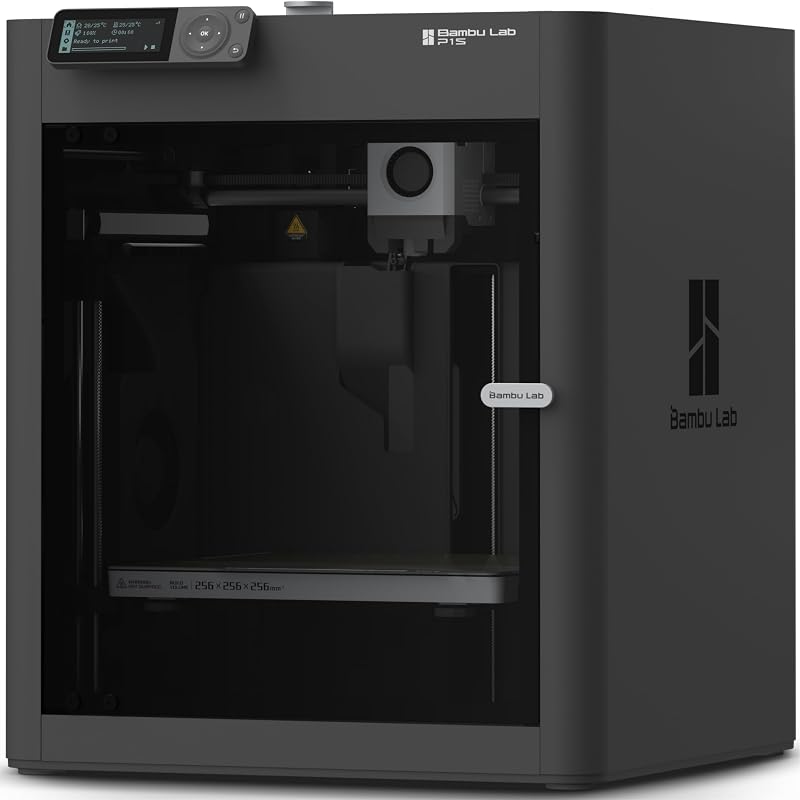
Beginner-Friendly Ecosystem with MakerWorld Model
The Beginner-Friendly Ecosystem with MakerWorld Model offering delivers an enclosed CoreXY Bambu Lab P1S 3D printer built for high-speed, precision FDM fabrication. Print operators who need complete structural enclosure and automated model management instead of fine-tuning bed surfaces on an open-frame platform should consider this full-system path.
Final Verdict
When asking whether the upgrade is justified, is neptune 4 pro pei worth it? For users tired of wrestling parts off the bed with scrapers or battling frustrating first-layer warping, the answer is a definitive yes. The KOYOFEI Neptune 4 Pro Build Plate combines a durable spring steel core with a high-adhesion textured PEI spray coating, offering an exceptionally reliable mechanical interface that excels across PLA, PETG, TPU, ABS, and Nylon.
By providing double-sided utility, tool-free flex release, and an attractive matte finish that disguises bottom layer defects, this accessory solves the most common daily friction points in 3D printing. As long as you maintain clean surface hygiene and take the necessary time to re-level the bed upon initial setup, this build plate represents one of the most effective, low-friction upgrades you can install on your machine.
FAQ
Does the KOYOFEI Neptune 4 Pro Build Plate require bed re-leveling after installation?
Yes. The manufacturer explicitly advises re-leveling the printer after installing the build plate. Differences in plate thickness require recalibrating your bed leveling and z-offset to guarantee optimal nozzle clearance and prevent bed scraping.
How should the textured PEI build plate be cleaned?
The surface should be washed regularly with ordinary dish detergent and warm water to remove grease and dust buildup. Avoid harsh chemical cleaners or abrasive pads that could degrade the textured PEI spray coating.
Can this build plate be used with flexible filaments like TPU?
Yes. The plate is fully compatible with TPU within a recommended bed temperature range of 50 to 60 degrees Celsius. Once the print finishes and the bed cools, the spring steel sheet can be gently flexed to release the flexible model without tearing.
What should I do if prints stick too firmly to the plate?
Always allow the build plate to cool completely to room temperature before attempting removal. If a print remains stubborn after cooling, remove the steel plate from the printer’s magnetic base and gently flex it outward to pop the print free.
Which printer models are compatible with this 235x235mm build plate?
According to the product specifications, this platform is directly compatible with the Elegoo Neptune 4, Elegoo Neptune 4 Pro, and Elegoo Neptune 3 Pro 3D printers.


