Attack Shark R1: Portable Tri-Mode Mouse for Editors on the Go
Read from the Amazon listing on 22 Sep 2026. Figures below are the seller’s; the score is the buyers’.
As Amazon Associates, we earn from qualifying purchases. This means we may receive a small commission at no extra cost to you if you click through and make a purchase.
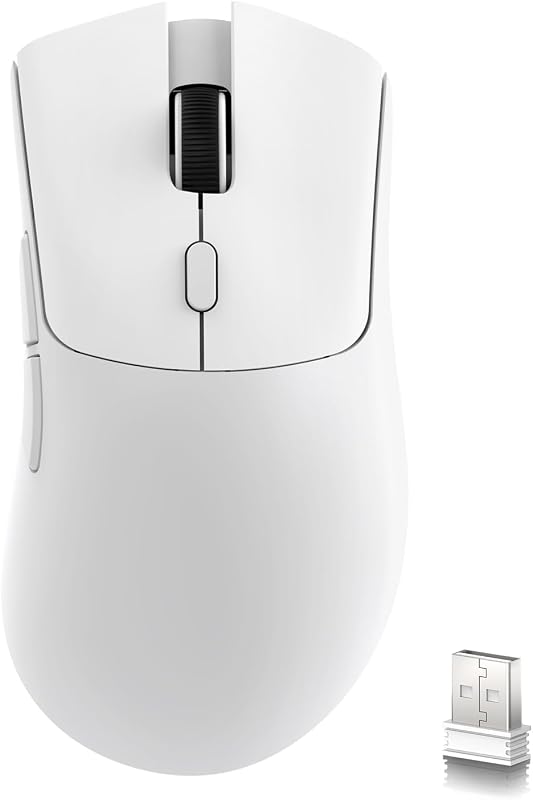
The Attack Shark R1 is an ultra-lightweight wireless pointing device built around a competitive gaming sensor and multi-protocol connectivity. Engineered with an ambidextrous shell and weighing just 55 grams, it serves as a dual-purpose tool for high-precision desktop work and rapid on-the-go adjustments. For creative professionals and mobile editors who demand pinpoint accuracy without hauling bulky hardware, it stands out as an agile, travel-ready workhorse that glides easily across tight working surfaces.
This compact pointer is ideally suited for digital nomads, traveling videographers, and graphic designers who constantly transition between hotel desks, airport terminals, and coffee shops while running multi-device setups. However, those who demand heavy palm support, specialized thumb rests, or deep productivity arrays featuring infinite-scroll wheels should look toward dedicated heavy-duty desktop peripherals instead.
Attack Shark R1 at a Glance
- Buyer score
- 4.0 / 5 on Amazon
- Brand
- Attack Shark
- Amazon code
- B0CP4TKLSX
Figures above are read from the Amazon product page, not measured here.
- Weight
- 55 grams
- Connectivity
- Tri-Mode (2.4GHz Wireless, Bluetooth 5.2, USB-C Wired)
- Optical Sensor
- PAW3311
- Maximum Sensitivity
- 18,000 DPI
- Tracking Speed
- 400 IPS
- Acceleration
- 40G limit
- Response Speed
- 1000Hz polling rate
- Switch Mechanism
- HUYU Switches (20 million click lifespan)
- Button Count
- 7 buttons
- Operating Range
- 10.0 meters
Portability and Travel Ergonomics
Listed spec Weight 55 grams
When packing light for long travel days, every ounce inside a tech pouch matters. The Attack Shark R1 weight sits at an impressive 55 grams, making it one of the lightest tri-mode pointing devices available for mobile workspaces. Because it relies on a streamlined plastic enclosure rather than dense internal metal weights, you barely feel it inside a backpack pocket or laptop sleeve. For creators who frequently travel with mirrorless cameras, heavy lenses, and laptop chargers, shaving mass on essential input gear provides immediate physical relief.
Deploying the Attack Shark R1 for travel is painless because of its compact, ambidextrous silhouette and integrated hardware storage. A dedicated magnetic compartment on the underside keeps the 2.4GHz USB wireless dongle secure during transit, preventing the common frustration of losing tiny receivers inside luggage seams. While evaluating compact gear like the attack shark r6, travel-friendly ergonomics remain paramount, and this unit delivers a comfortable grip contour that accommodates claw and fingertip styles during extended editing marathons in cramped spaces.
Despite its featherweight feel, the modern exterior remains solid enough to survive daily transit. The listing specifies a durable plastic shell without excessive decorative cutouts, protecting internal components from the stray dust, lint, and loose debris often encountered in transit. Its smooth glide feet ensure frictionless navigation over coffee shop wooden tables, hotel desks, and portable mouse mats alike.
Tri-Mode Connectivity and Platform Flexibility
Listed spec Connectivity Tri-Mode (2.4GHz Wireless, Bluetooth 5.2, USB-C Wired)
Mobile creative workflows demand rapid adaptability across varied computing setups, from dual-screen laptop rigs to standalone tablets. The Attack Shark R1 features comprehensive tri-mode connectivity, supporting 2.4GHz wireless, Bluetooth 5.2, and USB-C wired operation. A dedicated physical mode-switch button located on the base allows users to toggle between connections instantly, eliminating cumbersome software menus when switching tasks between field workstations.
Completing the Attack Shark R1 Bluetooth setup is straightforward across contemporary operating systems. Thanks to Bluetooth 5.2, the pointer pairs smoothly with lightweight tablets and secondary laptops within a reliable 10-meter operational range. When low latency is essential for high-framerate playback scrubbing, plugging in the 2.4GHz wireless dongle provides a plug-and-play 1000Hz response speed without requiring intrusive driver installations on client machines.
Cross-platform support is critical for creators operating mixed operating system environments. The Attack Shark R1 Mac compatibility allows macOS editors to utilize the pointer alongside Windows and PC platforms. While the listing notes explicit support extending through Windows XP, modern laptop platforms detect the basic input signals effortlessly. When switching between editing a timeline on a workstation and reviewing documents on an ultra-portable device, the tri-mode architecture keeps your desktop clutter-free and cable-independent.
Sensor Precision and Editing Performance
Listed spec Optical Sensor PAW3311
Detailed editing work requires granular cursor stability, especially when masking complex layers, nudging audio keyframes, or executing fine lasso selections. The Attack Shark R1 PAW3311 sensor delivers enterprise-grade tracking fidelity with up to 18,000 DPI sensitivity. With a tracking speed of 400 IPS and a 40G acceleration limit, the sensor translates rapid hand gestures into flawless cursor motion without skipping, stuttering, or introducing unexpected smoothing artifacts.
For creative applications, Attack Shark R1 productivity editing benefits directly from the six onboard DPI presets: 800, 1600, 2400, 3200, 5000, and 18000. Each preset shifts the optical profile instantly, illuminated by color-coded visual indicators so you can confirm your tracking resolution at a glance. Comparing this precision profile with alternatives like the attack shark x8 highlights how high-resolution optical tracking benefits tight timeline trims, allowing editors to sweep across dual 4K monitors on high DPI or drop down to 800 DPI for pixel-accurate brush retouches.
The 1000Hz polling rate ensures that the cursor refreshes every millisecond when connected via 2.4GHz wireless or USB-C. This high report rate eliminates perceptible input lag during fast cuts and multi-monitor dragging. Whether you are cutting video in Premiere, grading in Resolve, or adjusting vector curves in Illustrator, the PAW3311 optical engine delivers consistent, predictable translation across diverse surfaces.
Switch Durability, Button Layout, and Battery Life
Listed spec Switch Mechanism HUYU Switches (20 million click lifespan)
Repetitive editing actions place significant stress on primary click mechanisms over time. The Attack Shark R1 incorporates HUYU switch technology rated for 20 million clicks. These micro-switches offer crisp mechanical tactile feedback, rapid actuation, and consistent rebound force, preventing missed clicks during rapid cut trimming. Seven physical buttons are distributed across the ambidextrous chassis, providing dedicated side shortcuts for frequently used editing functions such as undo, redo, or timeline zooming.
Power management is an essential factor for remote professionals without constant access to wall outlets. The Attack Shark R1 battery life relies on an integrated rechargeable battery powered via a front-facing USB-C port, allowing creators to keep working in wired mode while charging simultaneously. While the listing does not specify the exact milliamp-hour capacity or total continuous operating hours per charge, the inclusion of a rechargeable battery eliminates the need to pack spare alkaline cells inside your luggage. Editors comparing hardware like the attack shark x66 will appreciate the simplicity of recharging via the same standard USB-C cable that powers their modern laptops and accessories.
The overall construction balances durability and lightweight handling. Because the chassis avoids internal decorative weights, the balance point remains centered directly over the PAW3311 optical eye. This neutral weight distribution prevents wrist strain during marathon post-production sessions, making it an ergonomic companion for travelers facing lengthy render-and-edit cycles.
Attack Shark R1 Pros and Cons
Pros
- Ultra-light 55g shell eases travel fatigue
- Versatile tri-mode wireless and wired connectivity
- Accurate PAW3311 sensor with 18,000 DPI
- Durable 20-million click HUYU switches
- Convenient bottom storage slot for USB dongle
Cons
- Lacks infinite-spin scroll wheel functionality
- Listing does not specify battery run hours
- No sculpted thumb rest for palm grippers
Who Should Buy the Attack Shark R1
Buy It If
- You travel frequently and want an ultra-light 55-gram pointer that minimizes gear bag bulk.
- You work across multiple devices and need rapid switching between 2.4GHz, Bluetooth 5.2, and USB-C wired connections.
- You require professional-grade tracking accuracy up to 18,000 DPI for detailed photo retouching and video timeline editing.
- You prefer a rechargeable internal battery with USB-C passthrough charging over carrying disposable batteries.
Skip It If
- You require a heavy, sculpted ergonomic shell with dedicated thumb wings and wide palm rests.
- You need extensive productivity hardware features such as free-spinning infinite scroll wheels or more than seven buttons.
- You prefer a purely wired desktop peripheral and do not need wireless mobility or multi-host pairing.
Attack Shark R1 Alternatives Worth a Look
While the primary subject provides an impressive blend of low weight and tri-mode flexibility, reviewing relevant alternatives helps clarify which mouse aligns best with your specific editing setup and packing habits.
12,000 DPI
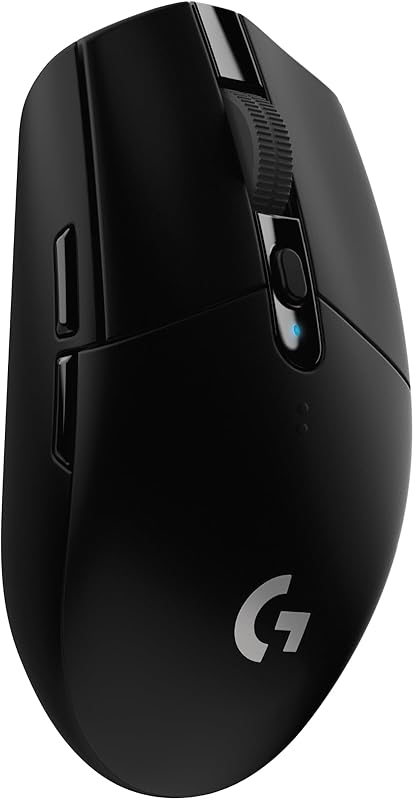
The 12,000 DPI Logitech G305 Lightspeed Wireless Gaming Mouse offers 6 programmable buttons, on-board memory, and a 250-hour battery life powered by a single AA cell. Mobile editors who prefer swapping a disposable battery rather than waiting on USB recharge cycles, or those who want dedicated on-board profile memory for established desktop macros, may favor this alternative despite its heavier footprint.

High performance
The High performance Logitech G502 Hero Wired Gaming Mouse is a fully wired peripheral equipped with a 25,600 DPI sensor, adjustable physical weights, RGB lighting, and 11 programmable buttons. Creative professionals who edit exclusively from a permanent studio desk and require an abundance of macro inputs will prefer its extensive physical controls over an ultra-lightweight travel mouse.

400 IPS speed
The 400 IPS speed ASUS ROG Keris Ultra Lightweight Wired Gaming Mouse features hot-swap switch sockets, PBT key surfaces, ROG feet, a paracord cable, and a 16,000 DPI optical sensor. Editors who prioritize long-term switch maintenance and zero-latency wired connections without wireless battery management will find this high-speed alternative appealing.
Final Verdict
When considering whether the Attack Shark R1 is worth it, the answer depends heavily on your mobility needs. Combining a feathery 55-gram chassis with a PAW3311 optical engine, 18,000 DPI sensitivity, and tri-mode flexibility, this peripheral handles demanding editing tasks without monopolizing luggage space. Its ability to switch effortlessly between Bluetooth 5.2 tablet setups and 2.4GHz low-latency laptop editing makes it a versatile tool for creators working outside traditional studio environments.
While it skips specialized productivity additions like hyper-fast scroll wheels or deep thumb supports, its core tracking and switch reliability make it an exceptional value for packing light. If your creative livelihood depends on traveling fast, keeping your setup agile, and retaining high-precision cursor control across diverse platforms, the Attack Shark R1 is a sensible, high-utility addition to your mobile production kit.
FAQ
What are the primary Attack Shark R1 specs?
The Attack Shark R1 specs include a 55-gram lightweight plastic body, a PAW3311 optical sensor with up to 18,000 DPI sensitivity, 400 IPS tracking speed, 40G acceleration, and a 1000Hz polling rate. It features 7 buttons, HUYU switches rated for 20 million clicks, and tri-mode connectivity via 2.4GHz wireless, Bluetooth 5.2, and USB-C wired connections.
How do you complete the Attack Shark R1 Bluetooth setup?
To initiate the Attack Shark R1 Bluetooth setup, toggle the physical mode switch located on the bottom of the mouse to the Bluetooth setting. Activate Bluetooth on your host laptop, PC, or tablet, search for the device in your operating system’s Bluetooth pairing menu, and select it to establish a connection within its 10-meter range.
Is the Attack Shark R1 compatible with Mac computers?
Yes, the Attack Shark R1 Mac compatibility allows macOS users to connect the mouse via Bluetooth 5.2, the 2.4GHz wireless USB receiver, or a direct USB-C cable. Basic pointing, tracking, scrolling, and primary click functions work across Mac platforms alongside Windows PCs.
How long does the Attack Shark R1 battery last on a single charge?
The listing does not specify the exact milliamp-hour capacity or total operating hours for the Attack Shark R1 battery life. However, the device contains a rechargeable battery powered via USB-C, enabling users to continue working in wired mode while replenishing power.
Does the Attack Shark R1 have internal storage for its USB receiver?
Yes, the 2.4GHz wireless USB receiver stores inside a dedicated slot located on the bottom of the mouse, making it easy to keep the dongle secure and prevent loss when traveling between workstations.


