Attack Shark X8 Review: Can a 55g Esports Mouse Anchor a Mobile Editing Kit?
Read from the Amazon listing on 22 Sep 2026. Figures below are the seller’s; the score is the buyers’.
As Amazon Associates, we earn from qualifying purchases. This means we may receive a small commission at no extra cost to you if you click through and make a purchase.
The Attack Shark X8 is an ultra-lightweight wireless peripheral designed to deliver competitive esports responsiveness in a compact, travel-ready format. Engineered around an optical architecture with an ultra-high sensitivity ceiling and multiple connection standards, it bridges the gap between fast-twitch gaming gear and precise creative control. For traveling video editors, digital nomads, and mobile professionals seeking accurate cursor travel without luggage penalties, it delivers top-tier tracking performance and massive battery reserves in an exceptionally lean physical profile.
This mouse is ideally tailored for mobile creators who spend hours cutting video timelines, retouching photos on laptop screens, or juggling multiple workstation environments across hotel desks and coworking lounges. Its featherlight build prevents wrist fatigue during long editing marathons, while its dual wireless modes ensure broad hardware flexibility. However, users who require dedicated horizontal thumb wheels, whisper-silent switches for quiet library settings, or heavily contoured ergonomic rests will likely find a dedicated office pointer better aligned with their daily routine.
Attack Shark X8 at a Glance

- Buyer score
- 4.9 / 5 on Amazon
- Brand
- Attack Shark
- Amazon code
- B0G2Y3L5BD
Figures above are read from the Amazon product page, not measured here.
- Sensor Model
- PixArt PAW3950MAX Optical Sensor
- Maximum Sensitivity
- 50 to 42,000 Adjustable DPI
- Tracking Speed and Acceleration
- 700 IPS, 60G Acceleration
- Polling Rate
- Up to 8000Hz (8K) Wired and Wireless
- Physical Weight
- 55 Grams
- Battery Capacity
- 800mAh Rechargeable
- Average Battery Life
- Up to 800 Hours
- Connectivity Modes
- Bluetooth, 2.4GHz Wireless, USB Wired
- Switch Durability
- Omron Micro Switches (100 Million Clicks)
- System Compatibility
- Windows 11, Ubuntu 22.04 Linux, PC, Tablet, Console
Sensor Accuracy and Precision for Editing Timelines
Listed spec Sensor Model PixArt PAW3950MAX Optical Sensor
Precision is the single most critical attribute when adjusting keyframes, trimming footage, or masking complex objects on high-resolution displays. The Attack Shark X8 integrates the flagship PixArt PAW3950MAX optical sensor, offering adjustable sensitivity ranging from 50 all the way to 42,000 DPI. Backed by a tracking velocity of 700 IPS and 60G acceleration, the attack shark x8 paw3950 hardware package guarantees that every physical flick, micro-nudge, and drag registers with absolute fidelity across your operating system canvas.
When evaluating the attack shark x8 for editing tasks, tracking consistency becomes immediately evident. Fine cursor movements do not suffer from jitter, pixel skipping, or artificial smoothing that often plagues entry-level office hardware. High-density video tracks and multi-monitor setups demand swift traversal paired with pinpoint stops, and the PAW3950MAX optical core handles wide sweeps across 4K displays as effortlessly as microscopic color-grading adjustments. Similar to the design philosophy observed in the Attack Shark R1, the hardware emphasizes pure input reliability over cosmetic gimmicks.
Competitive gamers and high-refresh-rate display users will appreciate that the unit supports up to an 8000Hz polling rate in both wired and wireless modes. The attack shark x8 8k polling capability drops input latency down to a rapid 0.3993ms actuation with zero debounce delay. While an 8K polling frequency demands more host processing overhead than standard office rates, having access to hyper-fast report rates ensures that high-speed cursor input mirrors hand movement in real time without lag or signal buffering.
Featherweight Mobility and Build Ergonomics
Listed spec Physical Weight 55 Grams
Minimizing everyday carry weight is paramount for mobile content creators who work from transit hubs, coffee shops, and remote studios. The attack shark x8 weight measures at just 55 grams, placing it among the lightest full-sized wireless mice available. Shaving unnecessary grams directly reduces inertia during rapid navigation across extended editing sessions, alleviating forearm strain and tendon fatigue when working on makeshift desks without ergonomic supports.
Despite its minimal weight, the chassis maintains solid structural integrity without adopting an open honeycomb shell that exposes internal electronics to dust, lint, and spills inside a travel bag. The exterior incorporates an innovative Nano-ice coating designed to keep the surface cool and sweat-free during long work blocks. The five-button layout utilizes an ambidextrous profile proportioned for medium and large hands, giving users ample palm and claw support without feeling cramped during extensive timeline scrubbing.
Underneath the primary left and right buttons, the mouse houses mechanical Omron micro switches rated for over 100 million clicks. These switches produce a crisp, tactile snap on actuation, providing clear physical feedback when executing cuts, double-clicking clips, or selecting minute anchor points. Travelers who value a balanced, featherweight package can see clear design progression across the lineup, much like the structural engineering found in the Attack Shark R6.
Tri-Mode Connectivity and Multi-Device Travel Flexibility
Listed spec Connectivity Modes Bluetooth, 2.4GHz Wireless, USB Wired
Modern mobile creators rarely rely on a single device, often transitioning between a primary editing laptop, a secondary desktop, and a mobile tablet. The Attack Shark X8 accommodates this workflow with full tri-mode connectivity, incorporating Bluetooth, 2.4GHz wireless via a dedicated receiver, and a wired USB connection. This versatility allows users to keep the ultra-responsive 2.4GHz connection paired to their primary workstation while toggling between secondary machines seamlessly.
For on-the-go scenarios where USB ports are scarce or dongles are inconvenient to unpack, the attack shark x8 bluetooth capability provides immediate pairing without monopolizing hardware ports. The mouse maintains stable transmission across mobile platforms, allowing you to edit footage on a Windows 11 ultrabook, execute system tasks on an Ubuntu 22.04 Linux workstation, or review assets on a compatible tablet without requiring multiple pointing devices.
When used as an attack shark x8 travel mouse, its plug-and-play adaptability shines in dynamic workspaces. If wireless interference spikes in crowded coworking spaces, connecting the included USB cable switches the mouse to wired operation while simultaneously topping off the internal cell. Having indoor and outdoor antenna reliability ensures stable wireless connectivity whether you are sitting at an office desk or working outdoors at an airport cafe.
Battery Endurance and Software Customization on the Go
Listed spec Battery Capacity 800mAh Rechargeable
Battery performance often dictates whether an ultra-light peripheral is truly viable for extended travel. Ultra-light gaming mice frequently sacrifice internal cell capacity to achieve lower physical weight, but this model takes the opposite route by incorporating a substantial 800mAh rechargeable battery.
The device also simplifies configuration through a modern, cloud-driven webpage driver instead of forcing users to install bulky local software packages. Traditional desktop utility programs can clutter storage, consume background memory, and introduce driver conflicts across different operating systems. With this open-source web platform, users simply visit the browser interface to adjust DPI stages, remap buttons, fine-tune debounce times, and alter polling rates directly from Chrome or Edge.
This browser-based driver approach is an exceptional asset for remote professionals working on managed enterprise laptops or alternative operating systems like Ubuntu Linux where proprietary executable installers often fail. Similar to the modern peripheral management seen with the Attack Shark X66, configuring onboard memory profiles through a lightweight web interface ensures that your settings travel with the mouse regardless of which host machine you plug into.
Attack Shark X8 Pros and Cons
Pros
- 55g featherweight chassis ideal for travel packing
- PixArt PAW3950MAX sensor up to 42,000 DPI
- Up to 8000Hz wired and wireless polling rate
- 800mAh battery rated up to 800 hours
- Tri-mode Bluetooth, 2.4GHz, and wired connectivity
- Webpage cloud driver eliminates local software installs
Cons
- Ambidextrous shape lacks sculpted productivity thumb rests
- No free-spin or horizontal tilt scroll wheel
- Crisp Omron switches lack silent dampening
Who Should Buy the Attack Shark X8
Buy It If
- You need an ultra-light 55-gram travel mouse that eliminates wrist strain during marathon mobile editing sessions.
- You demand class-leading optical precision from the PixArt PAW3950MAX sensor for timeline scrubbing and photo retouching.
- You manage multiple devices and require tri-mode switching across Bluetooth, 2.4GHz wireless, and wired USB modes.
- You prefer zero-bloat hardware configuration using an instant web browser interface instead of installed desktop drivers.
Skip It If
- You require a dedicated thumb-operated horizontal scroll wheel or infinite free-spin scrolling for massive spreadsheets.
- You work extensively in quiet libraries or shared recording rooms where crisp Omron switch clicks might disturb others.
- You strongly prefer heavily sculpted right-handed ergonomic contours over a symmetrical, ambidextrous shell.
Attack Shark X8 Alternatives Worth a Look
While the Attack Shark X8 delivers an exceptional blend of competitive sensor tracking and mobile battery life, varying workflows, budgets, and ergonomic preferences may lead some buyers to explore alternative options.
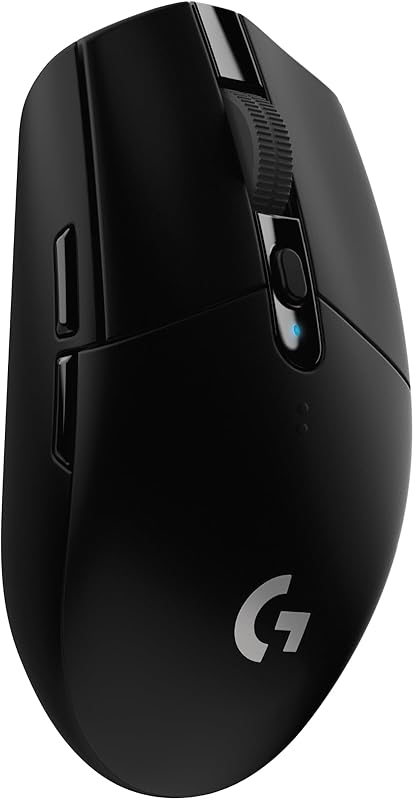
Logitech G305 Lightspeed
The Logitech G305 Lightspeed is a well-established wireless gaming mouse featuring a 12,000 DPI optical sensor, six programmable buttons, onboard memory, and full compatibility across PC and Mac platforms. It operates on a single AA battery that provides up to 250 hours of endurance, making it a reliable pick for travelers who prefer replaceable cells over internal USB recharging.
Creators should consider this option if they prioritize widespread brand ecosystem familiarity and mechanical button customization over the 55-gram featherweight build, 42,000 DPI sensor ceiling, and rechargeable 800mAh capacity found in the X8.

Logitech M185 Compact Wireless
The Logitech M185 is a stripped-back, ambidextrous wireless mouse equipped with a 2.4GHz USB-A nano receiver, standard optical tracking, and an impressive 12-month battery lifespan. It offers broad plug-and-play compatibility across PC, Mac, and laptop operating systems.
This compact pointer suits travelers who only require a basic, no-frills navigation tool for routine browsing and document processing, whereas power users needing extreme sensor accuracy, low-latency gaming speeds, and multi-device Bluetooth will find the X8 far more capable.

Logitech M240 Compact Silent
The Logitech M240 focuses entirely on quiet, clutter-free mobile productivity with direct Bluetooth connectivity, eliminating the need for a USB receiver. It features specialized quiet-click switches, three non-customizable buttons, and up to 18 months of battery life on compatible PC and Mac platforms.
Nomads who spend their workdays in coffee shops, libraries, and quiet shared offices will appreciate its muted acoustic profile, although it lacks the high-end PAW3950MAX tracking speed, high polling rates, and programmable versatility of the Attack Shark platform.
Final Verdict
When asking is attack shark x8 worth it for a mobile production kit, the balance of physical weight and internal hardware provides a decisive answer. Merging a 55-gram featherweight frame with an 800mAh battery reserve directly resolves the classic trade-off between portability and longevity. You no longer have to settle for sluggish, basic travel mice simply to keep your tech pouch light, nor do you have to compromise on tracking fidelity when operating away from a dedicated home workstation.
With its high-end PixArt PAW3950MAX optical sensor, versatile tri-mode connectivity, and hassle-free cloud web driver, the peripheral fits effortlessly into dynamic editing setups and dual-purpose gaming kits. The attack shark x8 specs prove that a mouse built for elite esports can easily anchor a professional on-the-go creative setup, provided you do not require specialized infinite scroll wheels or silent tactile switches.
FAQ
How much does the Attack Shark X8 weigh?
The Attack Shark X8 weighs approximately 55 grams. This ultra-lightweight construction makes it effortless to pack in any travel bag while minimizing forearm fatigue during long editing or gaming sessions.
What sensor is integrated into the Attack Shark X8?
The mouse utilizes the PixArt PAW3950MAX optical gaming sensor. It supports adjustable sensitivity from 50 up to 42,000 DPI, with a maximum tracking speed of 700 IPS and up to 60G acceleration for extreme cursor accuracy.
What connectivity options are supported on the Attack Shark X8?
It provides tri-mode connectivity, allowing users to connect via low-latency 2.4GHz wireless, Bluetooth, or standard wired USB. This makes switching between laptops, desktop workstations, and mobile tablets quick and easy.
How long does the Attack Shark X8 battery last?
The internal 800mAh rechargeable battery offers an average operational lifespan of up to 800 hours. The energy-efficient PAW3950MAX sensor optimizes power consumption so travelers rarely need to worry about constant recharging.
Do I need to install desktop software to configure settings on the Attack Shark X8?
No, the mouse uses an open-source cloud web driver that runs directly inside your web browser. You can customize DPI stages, polling rates, and button bindings without downloading or installing local utility software on your computer.


