Cricut Maker 4 In-Depth Review: Power Versus Portability
Read from the Amazon listing on 22 Sep 2026. Figures below are the seller’s; the score is the buyers’.
As Amazon Associates, we earn from qualifying purchases. This means we may receive a small commission at no extra cost to you if you click through and make a purchase.
For artisans running itinerant craft businesses, mobile event customization booths, or travel-heavy design studios, finding cutting equipment that balances pro-grade power with physical transportability is an ongoing challenge. The Cricut Maker 4 represents the latest flagship evolution in smart electronic craft fabrication, boasting automated tool heads capable of slicing, scoring, and engraving through a vast library of media. For digital creators seeking studio-level precision outside the traditional home workshop, this cricut machine 4 model brings unmatched fabrication muscle, though its heavy chassis demands intentional planning whenever you take your setup on the road. Our verdict: it is an uncompromised multi-material powerhouse built for serious creative production, but its sheer heft makes it a transportable workstation rather than a casual grab-and-go travel tool.
This machine suits production-focused artisans, pop-up apparel designers, and craft instructors who travel by vehicle and need to cut thick materials like leather and wood alongside high-volume custom decals. Conversely, digital nomads with strict carry-on luggage limits or minimal desk space should explore a smaller, dedicated portable vinyl cutting machine, as the unit requires substantial tabletop depth and dedicated transport protection.
Cricut Maker 4 at a Glance

- Buyer score
- 4.4 / 5 on Amazon
- Brand
- Cricut
- Amazon code
- B0DTQBZ3J3
Figures above are read from the Amazon product page, not measured here.
- Model Number
- 8002707
- Machine Dimensions
- 7.1 inches deep by 22.1 inches wide by 6.2 inches high
- Total Unit Weight
- 9.59 kg (approximately 21.14 lbs)
- Active Surface Area
- 270.25 square inches
- Material Compatibility
- 300+ materials (leather, wood, vinyl, iron-on HTV, cardstock, and more)
- Tool Operations Supported
- Cuts, draws, foils, scores, engraves, debosses, perforates
- Relative Cutting Speed
- Up to 2X faster than the previous model
- Printer Compatibility
- Compatible with most inkjet printers via Print-Then-Cut
- Software Ecosystem
- Design Space app for desktop and mobile devices
- Exterior Finish
- Seashell plastic housing
Portability, Dimensions, and Mobile Workspace Footprint
Listed spec Machine Dimensions 7.1 inches deep by 22.1 inches wide by 6.2 inches high
When assessing the Cricut Maker 4 for travel, physical dimensions and transit ergonomics form the first major hurdle. Measuring 7.1 inches deep, 22.1 inches wide, and 6.2 inches high, the machine occupies a noticeable chunk of any tabletop or workbench. In temporary setups—such as trade show vendor booths, craft retreats, or camper van workspaces—you must account not only for the static footprint but also for the feeding space required ahead of and behind the machine. Because material sheets and cutting mats pass completely through the carriage during operation, users need clear clearance along the entire 22.1-inch width to prevent snagging against walls or travel gear.
The cricut maker 4 weight is another defining reality for mobile crafters. Weighing in at 9.59 kg (roughly 21.1 pounds), this is a solid, hefty piece of machinery constructed with dense internal drive components and a plastic shell. Hoisting the unit into a reinforced rolling tote or carrying it from a vehicle trunk into an event hall requires deliberate effort. Unlike compact craft tools such as the cricut joy machine, you cannot simply slip the Maker into an everyday laptop bag or carry-on backpack. It demands a dedicated padded trunk or hardshell storage box to shield its internal alignment mechanisms and motorized carriage from bumps on the road.
For crafters who operate mobile personalization trailers, camper vans, or pop-up boutiques out of an SUV, the unit fits cleanly on heavy folding utility tables. However, traveling solo by air or attempting to pack this machine alongside personal luggage quickly proves prohibitive. The listing does not specify battery operation, which means you will always need access to stable standard electrical outlets or a sufficiently rated mobile power station at your remote working destination.
Material Capabilities and Multi-Tool Versatility
Listed spec Material Compatibility 300+ materials (leather, wood, vinyl, iron-on HTV, cardstock, and more)
The core justification for transporting a machine of this scale lies in its exceptional versatility across diverse substrates. The Cricut Maker 4 smart cutting machine is engineered to process more than 300 different materials, giving mobile creators the ability to run multiple product lines from a single device. Instead of hauling separate cutters for garments, paper goods, and rigid crafts, an artisan can handle soft iron-on heat transfer vinyl, heavyweight cardstock, tooling leather, and thin wood sheets using the same primary hardware. This breadth makes it a versatile production hub for multi-disciplinary crafters operating out of pop-up markets.
Beyond standard slicing, the machine performs an extensive array of mechanical functions that elevate finished goods. According to the manufacturer listing, the device not only cuts, but it also draws, foils, scores, engraves, debosses, and perforates. A mobile leatherworker can deboss custom emblems onto wallets, a wedding stationer can score intricate fold lines and foil elegant monograms, and an event organizer can perforate tear-off raffle tickets on demand. The bundled fine-point blade and fine-point pen offer immediate entry into drawing and precision cutting, while additional specialized tips expand your repertoire into engraving metal blanks and shaping delicate veneers.
Handling such a diverse range of cricut maker 4 materials also hinges on the machine’s compatibility with smart media. The bundled sampler pack includes Smart Vinyl, Matless Vinyl, Smart Iron-On, and Matless Heat Transfer Vinyl, enabling mat-free cutting for extended projects like shop banners and vehicle decals. When working with materials that require support, the included Light Grip Mat provides stable adherence for lighter papers and specialty cardstock. For crafters comparing options against simpler lines like the cricut explore 4 machine, the Maker’s expanded clearance, motor power, and ability to engrave or deboss rigid substrates provide genuine industrial-grade flexibility.
Cutting Speed and Production Efficiency on the Go
Listed spec Relative Cutting Speed Up to 2X faster than the previous model
Speed is a critical consideration for traveling entrepreneurs who fulfill customer orders in real time at fairs, festivals, or pop-up events. The manufacturer specifications highlight that this model cuts up to 2X faster than the previous generation model, significantly compressing production cycles during high-demand rushes. When you have a line of customers waiting at an outdoor market for customized T-shirts, personalized tumblers, or bespoke vinyl decals, faster throughput directly translates to better revenue and shorter wait times.
Analyzing the cricut maker 4 specs reveals an automatic operation mode paired with high-torque drive motors designed to sustain accuracy even at elevated velocities. Precision tracking prevents fine intricate lettering from tearing or bunching, which is a common issue when pushing budget cutters at top speeds. The ability to load matless Smart Materials directly into the feed rollers accelerates workflow even further, cutting down the prep time spent hand-rolling and smoothing vinyl sheets onto adhesive cutting mats.
For artisans upgrading their workshop from older hardware like the cricut maker 3 machine, the enhanced processing speed and consistent feed mechanics offer tangible time savings across bulk runs. Nevertheless, maintaining maximum cutting velocity requires a rigid, level tabletop. Because high-speed directional blade shifts generate lateral vibration across a 21-pound chassis, resting the cutter on an unstable folding camping table can introduce slight registration drift. Setting up on a solid, sturdy workstation ensures you reap the full benefits of the machine’s enhanced throughput.
Print-Then-Cut Capabilities and Inkjet Integration
Full-color customization has become a cornerstone of modern crafting businesses, and the Cricut Maker 4 print then cut feature serves as the bridge between digital illustration and physical product. By pairing the cutter with most standard inkjet printers, creators can print intricate full-color graphics—such as planner stickers, product labels, packaging seals, and colorful heat transfers—onto printable sticker paper or printable vinyl, and then feed those sheets into the Maker. Built-in optical sensors detect the printed bounding marks to trace and cut precisely around every contour.
For traveling artists and mobile merchandise vendors, integrating a compact inkjet printer alongside the Maker unlocks an on-demand printing studio anywhere power is accessible. Rather than pre-printing and storing hundreds of static sticker designs in transit totes where they risk moisture or bending damage, you can produce custom stickers on the spot. The fine-point blade delivers clean die-cut or kiss-cut borders around delicate illustrations without leaving ragged paper edges.
While the Print-Then-Cut workflow adds immense creative value, traveling creators must account for room lighting conditions in unfamiliar venues. The optical eye that reads registration marks requires even ambient light; direct outdoor sunlight or glaring spotlighting under a pop-up tent can sometimes interfere with sensor alignment. Setting up in a shaded, evenly illuminated work nook prevents misreads and ensures your custom stickers and labels peel cleanly off their backing sheets every time.
Software Integration and Digital Bundle Inclusions
Listed spec Software Ecosystem Design Space app for desktop and mobile devices
Hardware capability is only as effective as the software driving it, and the Maker 4 relies on the proprietary Cricut Design Space platform. Designed to be accessible for beginners while offering robust vector management for experienced designers, Design Space connects seamlessly to the cutter across desktop and mobile devices, including Mac, Windows, iOS, and Android. The listing highlights that no design experience is required to get started, backed by easy-to-follow online setup instructions and an automatic operation protocol that guides you through blade selections and material settings.
A major highlight of this specific package is the cricut maker 4 bundle inclusions. Right out of the box, users receive a physical starter kit consisting of a fine-point blade, fine-point pen, Light Grip Mat, weeder tool, and a materials sampler featuring Smart Vinyl, Matless Vinyl, Smart Iron-On, Matless Heat Transfer Vinyl, cardstock, and transfer tape. Additionally, the digital bundle unlocks 30 bonus premium-quality images inside Design Space upon machine registration. This combination allows mobile crafters to perform initial setup tests and finish their first few personalized projects immediately without purchasing extra accessories upfront.
The wider software ecosystem provides substantial creative assets, though long-term requirements warrant scrutiny. The free tier of Design Space supplies over 3,000 images and more than 100 fonts, which is ample for basic lettering and monogramming. For commercial creators seeking an exhaustive library, an optional paid Cricut Access subscription unlocks more than 1,500,000 images, 1,000 fonts, and over 100,000 ready-to-make projects. While cloud connectivity is central to Design Space, mobile makers working in remote locations must remember to download project files and fonts locally ahead of time to maintain workflow stability when mobile cellular data or event Wi-Fi is spotty. Those interested in detailed hardware comparisons can read our full cricut maker 4 cutting machine analysis to see how the software behaves across different production tiers.
Cricut Maker 4 Pros and Cons
Pros
- Cuts more than 300 diverse materials
- Up to 2X faster cutting speed
- Versatile multi-tool drawing, scoring, and engraving support
- Compatible with matless smart cutting materials
- Comprehensive starter bundle with tools and digital images
Cons
- Heavy 9.59 kg chassis limits easy transport
- Large 22.1-inch width requires substantial tabletop depth
- Requires standard electrical power with no internal battery
Who Should Buy the Cricut Maker 4
Buy It If
- You run a mobile craft business or event customization booth out of a vehicle and need heavy-duty multi-material cutting power.
- You want an all-in-one machine that cuts, engraves, debosses, scores, and draws across 300+ materials including leather and balsa wood.
- You produce high-volume custom stickers, decals, and apparel and need cutting speeds up to 2X faster than previous generation cutters.
- You value an out-of-the-box bundle that includes starter tools, cutting mats, a multi-material sampler, and 30 bonus digital designs.
Skip It If
- You need an ultra-lightweight cutting tool for carry-on airline travel or minimal backpack packing, where a 9.59 kg chassis is too heavy.
- Your crafting strictly involves small vinyl lettering and paper cards that do not require industrial tool pressure or 270 square inches of surface area.
- You operate in off-grid settings without access to standard electrical wall power or a high-capacity mobile power generator.
Cricut Maker 4 Alternatives Worth a Look
While the Maker 4 sets a high benchmark for automated cutting versatility, distinct mobile setups and specialized crafting preferences may call for alternative hardware solutions.

VEVOR Vinyl Cutting Machine
The VEVOR Vinyl Cutting Machine is a 12-inch, button-controlled vinyl cutter engineered for creating customized crafts, cards, and home decor. It comes equipped with over 20,000 built-in design resources and features broad operating system compatibility across Mac, Windows, Android, and iOS. Crafters who prioritize a dedicated physical button interface and a vast offline library of design templates over cloud-tethered design software will find this machine a compelling alternative for vinyl sign making.

Cricut Joy Xtra
The Includes 30 images in Design Space App Cricut Joy Xtra – Smart Cutting Machine bundle offers a significantly more compact footprint for creators who pack light. While it lacks the multi-tool engraving, debossing, and dense wood cutting capabilities of the full-sized Maker, it delivers essential smart cutting and sticker-making functions in a travel-friendly form factor that fits neatly into standard tote bags and smaller desks.
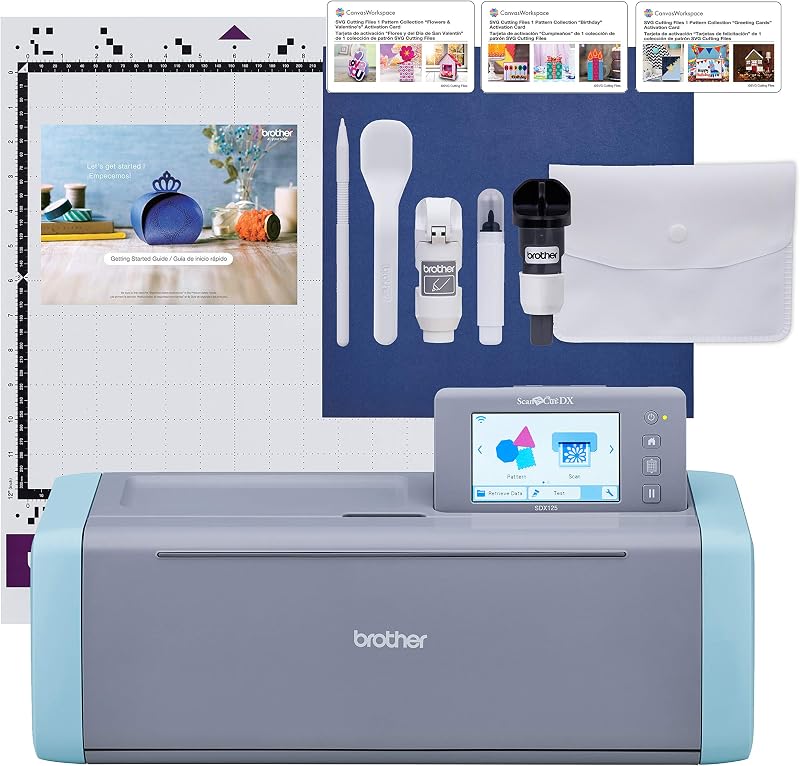
Brother SDX125E ScanNCut Electronic Cutting Machine
The Brother SDX125E ScanNCut Electronic Cutting Machine Scanner combines computerized cutting with an integrated optical scanner directly inside the hardware. This design is tailored for mobile artists who want to turn hand-drawn sketches, stamped patterns, or printed fabrics into cut files immediately on the device without having to route files through a computer or external inkjet printer.
Final Verdict
Deciding whether the Cricut Maker 4 is worth it depends heavily on your mobility style and production needs. If you are an event crafter, traveling apparel designer, or boutique maker who travels by car and needs professional-grade cutting across leather, wood, vinyl, and cardstock, this machine is an outstanding investment. Its 2X speed boost over previous models, combined with matless smart material feeding and a versatile 300+ material library, makes it a true mobile factory for creators who refuse to compromise on fabrication capability.
However, you must be realistic about its transport trade-offs. With a footprint measuring 22.1 inches wide and an overall weight of 9.59 kg, the Maker 4 is a transportable desktop appliance rather than an agile handheld travel gadget. If you have the vehicle trunk space, a sturdy table, and a reliable power source, it will reward you with unrivaled crafting muscle wherever your mobile studio sets up shop.
FAQ
How heavy is the Cricut Maker 4 and can it be transported easily?
The Cricut Maker 4 has an item weight of 9.59 kg (approximately 21.1 pounds) and measures 7.1 inches deep by 22.1 inches wide by 6.2 inches high. While it is certainly transportable in a vehicle using a dedicated padded tote or hard shell travel case, its substantial weight and dimensions make it too bulky for casual backpack carry or standard flight carry-on luggage.
What materials are compatible with the Cricut Maker 4?
According to the product specifications, the machine works with more than 300 materials. This broad compatibility includes delicate vinyl, iron-on heat transfer vinyl (HTV), cardstock, sticker paper, tooling leather, balsa wood, and various specialty craft fabrics.
What is included in the Cricut Maker 4 bundle?
The bundle includes the Cricut Maker 4 smart cutting machine in Seashell, a fine-point blade, a fine-point pen, a Light Grip Mat, a weeder tool, a materials sampler (containing Smart Vinyl, Matless Vinyl, Smart Iron-On, Matless Heat Transfer Vinyl, cardstock, and transfer tape), and 30 bonus digital images accessible in the Design Space app.
Does the Cricut Maker 4 run on battery power for outdoor travel use?
The listing does not specify battery operation. The machine operates automatically via standard corded electrical power, meaning mobile crafters working at outdoor events or remote sites will need access to a standard electrical outlet, an extension cord, or a portable mobile power generator.
How does the Print-Then-Cut feature function on this cutter?
The Print-Then-Cut feature allows you to print full-color graphics from the Design Space software using your own inkjet printer. Once printed on compatible sticker paper or printable vinyl, the sheet is loaded into the Cricut Maker 4, where internal sensors detect printed registration marks and cut precisely around your artwork contours.
Is a paid Cricut Access subscription required to operate the machine?
No, a paid subscription is not mandatory. The free version of the Design Space app includes over 3,000 images and 100+ fonts, alongside the 30 bonus images included with this bundle. The optional paid Cricut Access subscription is an add-on that expands your digital library to more than 1.5 million images, 1,000 fonts, and 100,000 projects.


